
Domino Train Generator
© Made by Ryan Anderson Buy me a coffee (Opens in a new tab)INSTRUCTIONS:
Welcome to Domino Optimo: The Domino Train Generator
Domino Optimo automatically matches your dominoes to build the longest train possible. Here's how:
Step 1:
Enter the Starter Domino
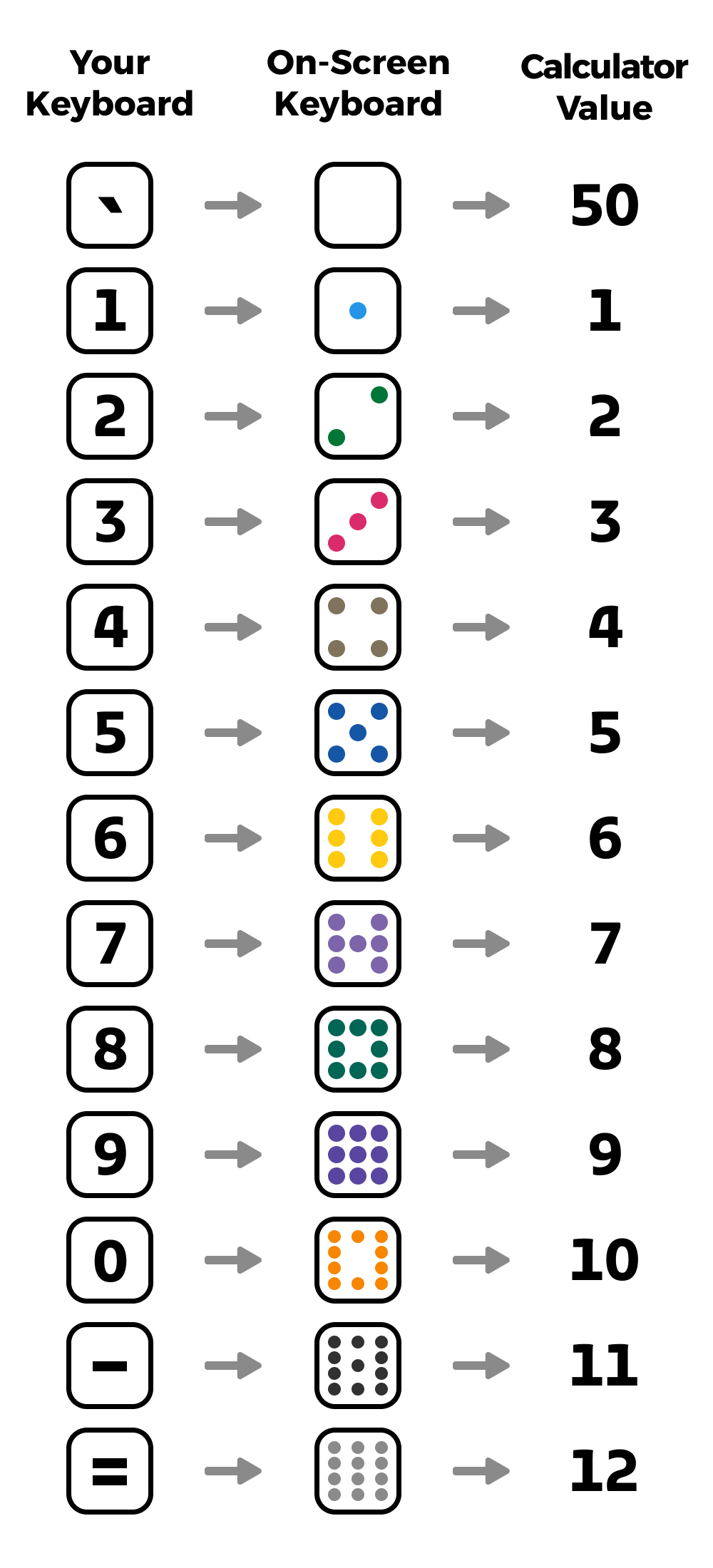
Enter the pip value of the starter domino, also known as the "Engine." The pip value is the number of dots on one side of a domino. Use the on-screen keyboard or your physical keyboard (see diagram below).
Step 2:
Enter Your Dominoes
Enter the pip values of as many or as few of your dominoes as you want to include in your results.
Step 3:
Build Your Trains
Hit the Build Trains button or press the Enter key to see your dominoes organized into trains. Remember to scroll horizontally within the results box, as Domino Optimo can build up to 12 trains at a time.
Step 4:
Use the Calculator
Open the calculator to tally the value of your dominoes. To add the "Double-Blank" domino (50 pts), hit the Blank domino or press the ` key.
Good luck and have fun playing with Domino Optimo!
STARTER
Starter value
YOUR DOMINOES
Domino 1-1
Domino 1-2
Domino 2-1
Domino 2-2
Domino 3-1
Domino 3-2
Domino 4-1
Domino 4-2
Domino 5-1
Domino 5-2
0